
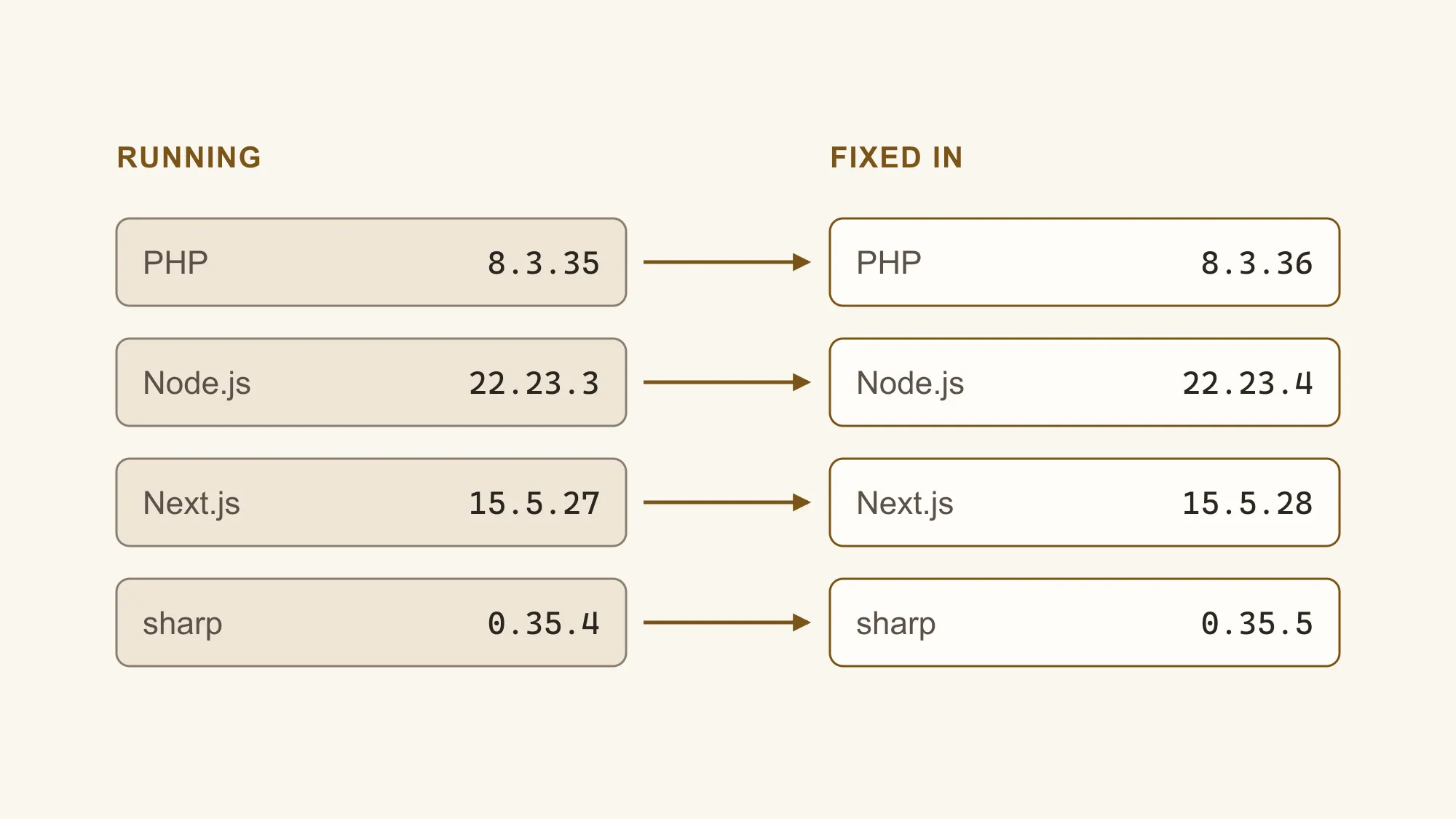
Is your website exposed to this month's security flaws?
A critical PHP flaw and new Node.js and Next.js fixes landed in October 2026. Here's how to tell which apply to your site, and who should fix them.
Within eight days in October 2026, PHP, Node.js and Next.js all shipped fixes for serious security flaws, and attackers were probing for the PHP one within hours. If you own a business website, the useful question isn't what each flaw does. It's which of them sits under your site, and who is supposed to apply the fix.
Most owners have less to do than the headlines suggest, but nearly everyone has something to check. This guide sorts it out by what your site is built on, with this month's releases as the worked example.
Which of this month's flaws could affect your website?
The PHP flaw reaches the most sites, because PHP runs underneath WordPress and many other content systems. The Node.js, Next.js and React fixes matter for custom sites built with JavaScript. Malicious npm packages target the developers who build those sites. If your site runs on a hosted builder such as Squarespace, the platform handles all of it.
PHP
Two critical flaws let an attacker run their own code on the server with ordinary web requests
WordPress and any other site running on PHP
PHP 8.5.12, 8.4.27, 8.3.36 and 8.2.35, released October 21, plus a setting change for a related flaw flagged October 23
Your host, or whoever manages the server
Node.js
Ten fixes, including a flaw in how Node.js unpacks compressed data that can allow remote code execution
Custom sites and apps that run on a Node.js server
Node.js 26.12.1, 24.22.1 and 22.23.4, released October 21
Your developer or hosting platform
Next.js and React
Two critical flaws that can allow remote code execution, and one that lets crafted requests stall the site
Custom sites built with Next.js or React Server Components
Next.js 15.5.28 and 16.4.1, and React 19.0.9, 19.1.10, 19.2.9 and 19.3.1, released October 14
Your developer
npm packages
Malicious packages and a self-spreading worm stole passwords and keys from the people who installed them
The computers and build systems of developers who make JavaScript sites
The bad packages were removed, and npm closed a publishing loophole on October 2
Your developer
The PHP flaws are the urgent ones. PHP's own announcement says every installation serving web pages is at risk. Versions 8.1 and older get no official release, only minimal source patches for 7.4, 8.0 and 8.1 that a host would have to apply itself. PHPSourcePHP: News Archive - 2026, 2026. Amazon's threat intelligence team saw an attempt to exploit them four days before they were announced, and broad exploitation attempts by release day, though it said it was unclear whether any would have succeeded. AWS Security BlogSourceAmazon Threat Intelligence identifies PHP2Shell exploitation prior to public disclosure in MadPot, 2026. CISA said the same day that it had not observed exploitation. CISASourceCritical Vulnerabilities in PHP Require Immediate Patching, 2026. Two days later, Beazley Security still knew of no confirmed mass exploitation, but reported that a security firm had a working exploit against unpatched PHP 8.4. Beazley SecuritySourcePHP2SHELL: Critical PHP RCE Flaws Threaten Web Infrastructure Amid Active Exploitation (CVE-2026-109618 & CVE-2026-109619), 2026. Treat your site as probed, not compromised, and patch anyway. Security researchers are calling them PHP2Shell, which is the name you'll see in the news.
Firewall services such as Cloudflare added rules to block the known attacks, and those buy time. Cloudflare itself says they don't replace updating PHP, and it has already seen attackers changing their requests to get around its rules. CloudflareSourceCloudflare deploys protections against php2shell vulnerability, 2026.
Updating isn't quite the end of it. On October 23, PHP flagged a related flaw in its session upload progress feature, CVE-2026-115560, and Cloudflare says it affects fully patched releases, including 8.5.12. CloudflareSourceCloudflare deploys protections against php2shell vulnerability, 2026. Until PHP's next regular release, PHP suggests switching that feature off, so it's one more thing to confirm with your host. PHPSourcePHP: News Archive - 2026, 2026.
Who is responsible for patching your site?
It depends on how much of the stack you own. A hosted builder patches everything underneath your content. WordPress splits the job: your host updates PHP and the server, and you or your developer keep WordPress, themes and plugins current. A custom site puts the framework and its packages with your developer, and the server with whoever hosts it.
| Layer | Hosted builder | WordPress, managed host | WordPress, own server | Custom site |
|---|---|---|---|---|
| The platform itself | Includedthe vendor | Your jobWordPress updates | Your jobWordPress updates | Developerframework updates |
| Server, PHP or Node.js | Includedthe vendor | Includedyour host, but confirm it | Your job | Developeror the hosting platform |
| Plugins, apps and packages | Your jobapps you added | Your job | Your job | Developer |
| Custom code and embeds | Your job | Your job | Your job | Developer |
| Logins and two-step verification | Your job | Your job | Your job | Your job |
"Your job" doesn't mean you have to do the work yourself. It means nobody else will do it unless you arrange it, whether that's a developer on call, your host's managed plan or a care agreement. The red cells are where sites quietly fall behind.
If you're weighing whether to stay on WordPress at all, that's a bigger decision than this month's patches. WordPress vs a custom website compares what each one asks of you in maintenance, and the CMS comparison tool checks the fit for your team.
How do you check a WordPress site for the PHP flaw?
Find your PHP version in WordPress, compare it with the fixed releases, then ask your host to confirm the update. Updating WordPress or a plugin doesn't update PHP. PHP is the server software underneath them, which is why WordPress.org says no WordPress update is needed for these flaws. WordPress.orgSourceCritical PHP Security Release, 2026.
- Find your PHP version. In the WordPress dashboard, go to Tools, then Site Health, open the Info tab and expand Server. Many hosts show it in their control panel too.
- Compare it with the fixed releases. You need PHP 8.5.12, 8.4.27, 8.3.36 or 8.2.35, or later on the same branch. Anything older than 8.2 has no official release, only source patches your host would have to apply.
- Ask your host to confirm the update. Some hosts apply the fix without changing the version number WordPress shows, so the number alone can mislead. Ask about the October 23 setting change too.
- Plan the move off old PHP. On 8.1 or older, the fix is upgrading PHP, which can break old themes and plugins. Test it on a copy of the site first.
Most hosts will have patched by the time you read this, but it's worth a short message to be sure. Ask a question that can only be answered with specifics, and keep the reply.
Has PHP on our server been updated with the fixes for CVE-2026-109618 and CVE-2026-109619, is session.upload_progress.enabled set to 0 until the next PHP release, and were the PHP processes restarted afterwards?
The restart matters because PHP keeps running the old code until its worker processes are restarted, and the setting only takes effect after a restart too. PHP says to change it in the server's main configuration, not in a per-site settings file. A good host will know this and answer in a line.
If you manage your own server and it runs PHP older than 8.2, WordPress.org's advice is blunt: consider taking the site offline while you upgrade, as several national cyber security agencies recommend. Cloudflare and AWS put the affected range back to PHP 5.4, so an old server isn't safe just because it's old.
While you're in the dashboard, check WordPress itself. Version 7.1.3, released October 6, fixed seven security issues of its own, and sites with automatic updates should already have it. WordPress.orgSourceWordPress 7.1.3 Maintenance and Security Release, 2026.
Updating WordPress or a plugin doesn't update PHP.
What should Squarespace, Wix, Shopify and Webflow owners check?
Nothing in this month's releases needs patching on your side. These platforms run and update the servers, languages and frameworks for you. What they can't control is what you add to the site: custom code, embedded scripts, installed apps and the people who can log in. That's where your attention belongs.
Patched for you
- Hosting, servers and the software they run
- Security fixes to the platform itself
- HTTPS certificates and protection from traffic floods
Still yours to check
- Code pasted into headers, footers or embed blocks
- Third-party scripts such as chat widgets and booking tools
- Apps and extensions you installed
- Staff and former staff who can still log in
- Two-step verification on every login
Webflow says its patches and updates are automated, with no customer maintenance. WebflowSourceWebflow Security & Compliance. Wix describes fully managed protection with round-the-clock monitoring on every site, and puts two-step verification and collaborator permissions in your hands. WixSourceWebsite Security | Built-in Protection for Your Site. Shopify draws the same line: it does what it can, and there are steps you need to take on your own. ShopifySourceShopify Security.
A script you paste in runs with the same trust as the platform's own code. If the company behind a chat widget or tracking tag is compromised, your site serves whatever they serve. Remove scripts you no longer use, and know which ones are left.
What should you ask the developer of a custom site?
Ask which versions of Next.js, React and Node.js the live site runs, whether they've been updated since mid-October, and how your developer heard about the releases. A good answer names versions and dates. A vague answer, or no answer, tells you nobody is watching these releases for you.
- Which framework and server versions is the live site running today?
- Has it been updated for the October 14 Next.js release and the October 21 Node.js release?
- How do you hear about security releases, and how quickly do you apply them?
- Who else can publish code or packages that end up on our site?
If your site is hosted on Vercel, don't assume the platform took care of it. The Next.js announcement tells you to update your Next.js dependencies, and neither it nor the advisories say hosted sites were protected automatically. Next.jsSourceNext.js Security Update for Upstream Vulnerabilities, 2026. Sites still on Next.js 13 or 14 need a bigger step, because there's no patched release for those versions.
For your developer: versions, and the catches we hitTechnical
- Next.js: 15.5.28 or 16.4.1. The
use cacheremote code execution affects 16.x only. The image optimization flaw (on glibc-based Linux) and the Server Actions denial of service reach back to 15.x and earlier. See the image optimization advisory and the Server Actions advisory. - sharp: 0.35.5 or later. A package-manager override or an old lockfile can keep a vulnerable
sharpinstalled after you bump Next.js. Check what is actually resolved withnpm ls sharporpnpm why sharp, not justpackage.json. - Next.js 13 and 14: forcing
sharpto 0.35.5 covers the image flaw, but the Server Actions denial of service has no workaround and no 13.x or 14.x patch. Plan the move to 15.5.28. - React Server Components:
react-server-dom-*19.0.9, 19.1.10, 19.2.9 or 19.3.1, per the React advisory. - Node.js: 22.23.4, 24.22.1 or 26.12.1, per the October 21 release notes. Node 20 reached end of life in April and Node 25 in June, so neither gets these fixes.
- Vite: the dev server should never be reachable from the internet. Singapore's Cyber Security Agency reported active exploitation of exposed Vite dev servers in September, aimed at
.envfiles and cloud keys. - npm: commit lockfiles and review install scripts. If anything from the MALFEX campaign or tensorlake 0.5.144 was installed, follow the researchers' clean-up steps before rotating tokens. GitHub also expired unvalidated trusted publishing setups on October 2.
- zod: a high-severity advisory from October 1 lets a large array exhaust server memory when a schema has no length limit. It's fixed in zod 4.6.6, with no zod 3 patch, so cap arrays with
.max()wherever a schema parses request input. - After updating: run
npm audit --omit=dev(orpnpm audit --prod). It flags anything published since this article, and the advisory list keeps growing after a release like this.
If the answers point to a site nobody is maintaining, that's a web development conversation as much as a security one. A site with no one watching its dependencies tends to fall behind on everything else too.
How did we patch our own sites?
We run our own site and several client sites on Next.js, so we did what this article asks you to do. The check itself was quick. The useful part was finding the one setting that would have left us exposed after an update that looked successful.
- Listed every project. We checked every JavaScript project we run, including a hosted app with its own release process. None of them use PHP.
- Checked versions against the advisories. Every Next.js project we checked was on an affected version, and most had an image library older than the fixed release.
- Looked for anything holding old packages in place. Our own site had an override pinning sharp, the image library, at 0.35.4. On a client site, the upgraded Next.js still accepted an older sharp. Both needed an explicit fix beyond the Next.js update.
- Upgraded on a separate copy of the code. Type checks, linting, the test suite and a full production build all ran, then we served the build locally to confirm pages and images load.
- Reviewed, then released. Each live site got its own change, so it could be reviewed and rolled back on its own. All five live sites were patched the same day.
- Checked the live sites, then checked again. We confirmed each live site reports the patched version, not just the code. The next day we re-ran the checks. The image library was fixed everywhere, and the new advisories that had appeared didn't reach our servers.
Overrides like this are normal. Developers add them to force a fix for an older problem, then move on. That's why "we updated Next.js" and "we checked what's actually installed" are different answers, and only the second one tells you the site is fixed.
How can you tell if your website was already hacked?
Start with Google. Search Console's Security issues report lists hacked content and malware Google has found on your site, with example pages and the date each was first detected. Google Search Console HelpSourceSecurity issues report. Then search Google for site: followed by your domain, and look for pages you never published. Odd redirects and unknown admin users are the other common signs.
- Search results for your site show pages, languages or products you don't recognize.
- Visitors arriving from Google, or on a phone, get sent somewhere else.
- A browser, Google or your antivirus warns that the site is unsafe. Google's Safe Browsing site status checks this for any address.
- An administrator account you didn't create, or a login that stopped working.
- Your host emails about unusual activity or suspends the account.
Hacked pages are often hidden from you. Attackers can show spam to search engines and a normal page to everyone else, which is why Google suggests checking the site as Google sees it rather than trusting your own browser. web.devSourceHow do I know if my site was hacked?. A clean result means none of the known signs are showing; on a server that ran unpatched PHP this month, ask your host to review its logs as well.
If you do find something, don't delete files or restore an old backup straight away. Take a copy of the site as it is, change every password, and bring in your host or developer, so the way in gets closed and not just the damage.
When should you hand this to someone else?
When nobody in the business can answer the four questions at the top of this page. Each release like these needs someone to notice it, check your site, apply the fix and confirm nothing broke. That's ongoing maintenance, and it's far easier to arrange before an urgent week than during one.
If you're not sure what your site runs on or who keeps it updated, send us the address. We'll tell you what it's built on, what still needs patching and who should do it. If you'd rather someone watched these releases for you every month, ask about ongoing care.
References (22)
- PHP. (2026). PHP: News Archive - 2026. php.net. https://www.php.net/archive/2026.php
- AWS Security Blog. (2026). Amazon Threat Intelligence identifies PHP2Shell exploitation prior to public disclosure in MadPot. Amazon Web Services. https://aws.amazon.com/blogs/security/amazon-threat-intelligence-identifies-php2shell-exploitation-prior-to-public-disclosure-in-madpot/
- Cybersecurity and Infrastructure Security Agency. (2026). Critical Vulnerabilities in PHP Require Immediate Patching. CISA. https://www.cisa.gov/news-events/alerts/2026/10/21/critical-vulnerabilities-php-require-immediate-patching
- Beazley Security. (2026). PHP2SHELL: Critical PHP RCE Flaws Threaten Web Infrastructure Amid Active Exploitation (CVE-2026-109618 & CVE-2026-109619). Beazley Security Labs. https://labs.beazley.security/advisories/BSL-A1233
- Cloudflare. (2026). Cloudflare deploys protections against php2shell vulnerability. The Cloudflare Blog. https://blog.cloudflare.com/php-vulnerabilities-waf-protection
- WordPress.org. (2026). Critical PHP Security Release. WordPress News. https://wordpress.org/news/2026/10/critical-php-security-release/
- WordPress.org. (2026). WordPress 7.1.3 Maintenance and Security Release. WordPress News. https://wordpress.org/news/2026/10/wordpress-7-1-3-maintenance-and-security-release/
- Webflow. Webflow Security & Compliance. Webflow. https://webflow.com/security
- Wix. Website Security | Built-in Protection for Your Site. Wix. https://www.wix.com/website-security
- Shopify. Shopify Security. Shopify. https://www.shopify.com/security
- Vercel. (2026). Next.js Security Update for Upstream Vulnerabilities. Next.js Blog. https://nextjs.org/blog/nextjs-security-update-october-14-2026
- Vercel. (2026). Next.js: Unauthenticated Remote Code Execution in Image Optimization API when SVG files are used. GitHub Security Advisories. https://github.com/vercel/next.js/security/advisories/GHSA-2464-fhr4-w9xw
- Vercel. (2026). Next.js: Denial of Service in App Router using Server Actions. GitHub Security Advisories. https://github.com/vercel/next.js/security/advisories/GHSA-p3m5-59mp-jv5r
- Meta. (2026). Unauthenticated Remote Code Execution in React Server Components. GitHub Security Advisories. https://github.com/facebook/react/security/advisories/GHSA-xqc2-xf4c-x3h3
- Node.js. (2026). Wednesday, October 21, 2026 Security Releases. Node.js Blog. https://nodejs.org/en/blog/vulnerability/october-2026-security-releases
- Cyber Security Agency of Singapore. (2026). Active Exploitation of Vulnerability in Vite Development Servers. CSA Singapore. https://www.csa.gov.sg/alerts-and-advisories/alerts/al-2026-124/
- Orca Security. (2026). Malicious npm Campaign "MALFEX" Delivers RAT and Stealer via Eight Packages with 40,000+ Downloads. Orca Security. https://orca.security/resources/research/malicious-npm-campaign-malfex-delivers-rat-and-stealer-via-eight-packages-with-40000-downloads/
- SafeDep. (2026). tensorlake 0.5.144 npm Compromise Ships Mini Shai-Hulud. SafeDep. https://safedep.io/tensorlake-npm-compromise-mini-shai-hulud
- GitHub. (2026). Unvalidated npm trusted publishing configurations now expire. GitHub Changelog. https://github.blog/changelog/2026-10-02-unvalidated-npm-trusted-publishing-configurations-now-expire/
- GitHub. (2026). Zod can exhaust memory while validating oversized constrained collections. GitHub Advisory Database. https://github.com/advisories/GHSA-mrhx-c7xc-m3w5
- Google. Security issues report. Google Search Console Help. https://support.google.com/webmasters/answer/9044101
- Google. How do I know if my site was hacked? web.dev. https://web.dev/articles/how-do-i-know-if-my-site-was-hacked
Not sure who keeps your site patched?
Send us your site's address. We'll tell you what it runs on, what still needs updating and who should do it.