

WordPress vs a custom website: which architecture fits your business?
Compare WordPress, custom websites and headless CMS builds by editing, SEO, performance, security, integrations, AI and long-term cost.
WordPress is usually the better fit for a conventional content-led website with a familiar editing team and standard functionality. A custom website becomes worth considering when the site has to behave like part of the business: handling bespoke workflows, deep integrations, structured content, differentiated interaction, or product-like features. The choice is not always WordPress or custom. WordPress can remain the CMS behind a custom front end.
WordPress vs a custom website: the short answer
Choose conventional WordPress when the website mainly publishes pages and posts, the team already knows the editor, and well-maintained extensions cover the required features. Choose a custom architecture when the website has become a sales or operating system and the team is forcing important workflows through themes, page builders, plugin chains, or disconnected tools.
Do not ask which platform is better in isolation. Ask who edits the site in year two, what the site must do beyond publishing, which systems it must connect to, and who owns maintenance when an integration or dependency changes.
The studio builds conventional CMS sites, custom WordPress implementations, and custom front ends. That makes “stay on WordPress” a legitimate result, not a failed sales call.
WordPress vs a custom CMS: a custom website can still have one
A CMS is the editing and publishing layer. It does not have to control the visitor-facing design. A custom Next.js front end can receive structured content from WordPress, Sanity, Contentful, Payload, or another CMS through an API, while editors continue managing approved fields, images, relationships, drafts, and publishing states.
That separation is usually described as headless or decoupled architecture. The CMS is the back end. The custom application is the front end. WordPress officially exposes posts, pages, media, users, content types, revisions, and settings through its REST API, so it can serve as either the entire website or only the content system behind one.
A properly scoped custom CMS can give the team:
- Structured fields instead of an unrestricted blank canvas
- Reusable content types for services, locations, team members, resources, properties, or products
- Roles and permissions for authors, editors, marketers, and administrators
- Draft previews and approval workflows before publishing
- Content reused across the website, applications, email, sales tools, and AI interfaces
- Guardrails that prevent routine edits from breaking layout, accessibility, metadata, or structured data
The trade-off is real. Preview, publishing, caching, permissions, hosting, and recovery still need to be designed. Headless is not a fashionable synonym for better. It earns its cost when a decoupled content model solves an actual operating problem.
An implemented example: this website's editing boundary
The studio's own service pages separate editable content from the page template. A service record holds the hero, deliverables, process, proof and questions. The application validates the record and renders those fields through one shared layout. This is a working content boundary on this website, not a hypothetical client migration.
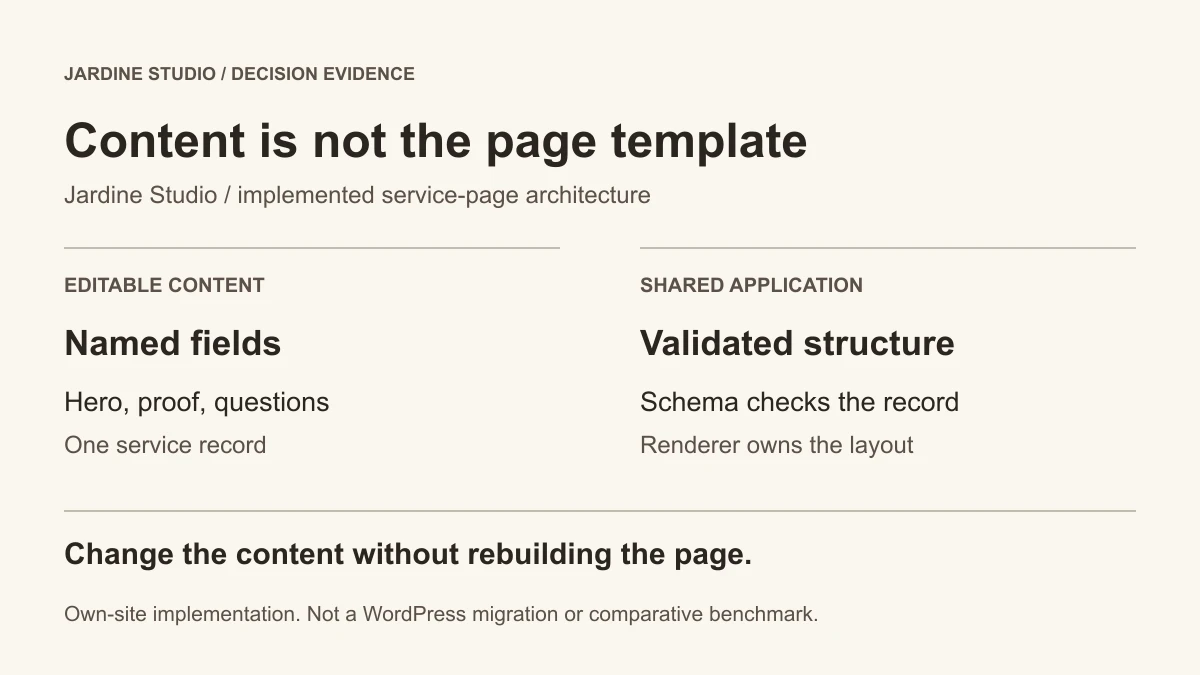
The problem is repeated service information that needs consistent structure. The constraint is that changing one service's copy should not require copying its page component, while a layout change should apply across the family. The implementation stores the records in JSON, checks their shape with a Zod schema, and passes them to the shared service-page renderer.
Inspect the result on the website redesign service page and technical SEO service page. Their content differs, but the shared sequence keeps the hero, process, proof, questions and next step consistent. The architecture diagram above records that division of responsibility.
The boundary also creates a trade-off: the editor can change supported fields, but a new section type or a different shared sequence requires development. That is the decision to test with the editing team. Would governed fields reduce repeated work, or would they block the layouts the team actually needs?
This implementation uses repository-backed content, not WordPress. It demonstrates the separation that a CMS discussion needs to resolve; it does not establish that this stack is faster, cheaper or easier than WordPress. A familiar WordPress editing workflow can remain the right choice when it meets the same requirements.
Evidence: Jardine Studio's service-content records, validation schema and shared renderer, reviewed September 10, 2026. The diagram is an original summary of the implementation, not a CMS interface screenshot or a performance test.
The four architectures hidden inside this comparison
“WordPress vs custom website” sounds binary, but buyers usually have four viable options. Naming them prevents a team from rejecting WordPress when the real problem is a page builder, or buying a complex headless stack when a disciplined WordPress build would work.
Conventional WordPress
- Front end
- WordPress theme or page builder
- Editing
- WordPress admin and block editor
- Best fit
- Content-led marketing sites with standard features
- Main risk
- Plugin, theme, update, and page-builder dependencies
Custom WordPress
- Front end
- Bespoke theme and controlled components
- Editing
- WordPress with fields and blocks shaped around the team
- Best fit
- Teams that want familiar editing without a generic theme
- Main risk
- Still requires WordPress maintenance and capable engineering
Headless WordPress
- Front end
- Custom Next.js, React, or another application
- Editing
- WordPress used as the content API
- Best fit
- Custom experiences with an established WordPress editorial team
- Main risk
- Two systems, more deployment logic, and preview complexity
Custom front end + structured CMS
- Front end
- Purpose-built website or web application
- Editing
- Sanity, Contentful, Payload, or another structured CMS
- Best fit
- Reusable content, strict governance, integrations, and product-like features
- Main risk
- Higher initial design and implementation responsibility
Where conventional WordPress wins
WordPress wins when publishing is the main job and the organization values familiarity, a large support ecosystem, and faster access to standard functionality. It remains a rational choice for content-heavy websites, WooCommerce stores, memberships, publications, and teams already staffed to maintain it properly.
The team already knows how to use it
Changing the CMS has an organizational cost. If marketers publish efficiently in WordPress, the content model is sound, and the current implementation is maintainable, preserving that workflow may matter more than adopting a newer framework.
The required functionality is conventional
Forms, editorial publishing, basic ecommerce, event listings, memberships, gated resources, and multilingual content can all be handled in WordPress. A mature, actively maintained extension may be more economical than rebuilding a solved feature.
The business can fund maintenance
WordPress itself is not the maintenance problem. An unmanaged collection of themes and plugins is. WordPress's own security guidance tells site owners to keep core, plugins, and themes current and to use actively maintained software. With backups, controlled access, updates, testing, and a responsible maintainer, WordPress can be a durable platform.
Where a custom website wins
A custom build wins when the website's differentiating value lives in its workflow, interaction, data, or integration layer. It gives the team control over what is rendered, what JavaScript ships, how content is modeled, and how the interface behaves without negotiating every requirement through a theme or extension.
The website is part of how the business operates
This is the strongest buying threshold. The site may need to qualify a lead, calculate a price, create a booking, route an intake, query inventory, generate a document, manage a member workflow, or synchronize data with a CRM. These are software requirements wearing a marketing-site coat.
The studio's custom web development work covers booking systems, intake flows, calculators, CRM integrations, member areas, internal tools, and focused web applications. When these functions drive the project, the architecture should be selected around the workflow rather than around the CMS brand.
The design system is commercially important
Custom does not mean adding animation everywhere. It means the page hierarchy, interaction, motion, typography, and responsive behavior can be designed around the buyer instead of around a theme's assumptions.
Award galleries make the upper boundary visible. Awwwards documents Viens-là using WordPress as its back end with a custom Three.js/WebGL front end. The Alejandro Schintu portfolio is another published headless WordPress and Next.js example. Neither proves that a service business needs WebGL. They prove that WordPress editing and a custom visitor experience can coexist.
Three.js earns its place for product visualization, destination storytelling, interactive exhibits, or a brand experience where spatial interaction is part of the idea. Decorative 3D that delays the page, ignores reduced motion, or obscures the next action is not premium. It is conversion friction.
The content must work in more than one place
A structured CMS is useful when the same approved content powers a website, multiple locations, a mobile experience, sales collateral, an authenticated portal, or an AI assistant. The value is not the word “headless.” The value is maintaining one governed source instead of copying the same fact into six systems.
WordPress vs custom for SEO and performance
Either architecture can rank and either can be implemented badly. Custom development provides more control over rendering, metadata, internal linking, image delivery, caching, redirects, and the amount of client-side code. WordPress provides a mature publishing system and can produce excellent technical SEO when its theme, plugins, hosting, and content structure are handled well.
Google explicitly says that strong Core Web Vitals and page experience do not guarantee top rankings. Search performance also depends on intent fit, content quality, authority, internal architecture, and competitive evidence. The platform is an implementation surface, not a ranking strategy.
The measurable advantage of custom is control. Next.js includes production tools for caching, image optimization, metadata, server rendering, and static delivery, but the developer still has to make good decisions.
- LCP · loading
- ≤ 2.5 s
- INP · responsiveness
- ≤ 200 ms
- CLS · visual stability
- ≤ 0.1
Source: Web Vitals
Jardine's Black Salt Room case study shows what that control can produce in a focused build: Lighthouse 100 across Performance, Accessibility, Best Practices, and SEO on mobile and desktop, 1.5-second mobile LCP, and zero layout shift, measured in Lighthouse at its May 2026 launch. That is project proof, not a promise that every custom website receives the same score.
WordPress vs custom for security and maintenance
WordPress is not inherently unsafe and custom code is not maintenance-free. The useful comparison is the surface that must be governed: WordPress core, themes, plugins, hosting, users, backups, and configuration on one side; framework dependencies, hosting, APIs, custom code, monitoring, and integrations on the other.
Conventional WordPress becomes expensive when nobody owns updates, unused plugins remain installed, page builders conflict, or critical behavior depends on abandoned extensions. WordPress's hardening guidance emphasizes updates, backups, permissions, trusted sources, and removing unused software.
Replacing thirty plugins with a poorly documented application is not risk reduction.
A lean custom website can reduce the number of moving parts, but only if it is deliberately built and maintained. Replacing thirty plugins with a poorly documented application is not risk reduction. Jardine projects define client-owned accounts and access, the editing boundary, deployment responsibility, analytics, source access, and handoff so “ownership” describes an operating model instead of a slogan.
AI makes architecture more important, not less
AI-assisted coding has lowered the cost of producing code. It has not removed requirements, security, data governance, accessibility, testing, monitoring, or maintenance. A generated feature still needs to be connected to the right source of truth and prevented from taking unsafe or expensive actions.
A useful AI feature may need to retrieve only approved content, return a structured answer, query availability, create a CRM record, call a booking tool, request human approval, and preserve an audit log. A custom architecture can provide that interface and control layer. WordPress can also participate through its APIs or custom plugins. The distinction is not “WordPress cannot do AI.” It is whether the current architecture makes the workflow dependable.
For most businesses, an embedded chatbot is not the prize. A better intake, faster qualification, searchable knowledge base, staff-facing assistant, or controlled follow-up workflow is. The studio's web development engagement treats model choice as one part of the system, alongside the data boundary, permissions, human handoff, failure state, and measurement plan.
What WordPress and a custom website cost
WordPress usually costs less to launch when a theme and existing extensions cover the job. Custom usually costs more initially because the architecture, design system, components, integrations, testing, deployment, and editing experience are being shaped for the business. The useful comparison is the three-year operating cost, including internal time and rework.
Include these costs in both estimates:
- Discovery, content, design, development, migration, and launch
- Hosting, licenses, monitoring, backups, and updates
- Developer or agency maintenance
- Staff time spent editing, troubleshooting, and working around the system
- Integration changes when a CRM, booking platform, payment provider, or API changes
- The cost of rebuilding features that the original architecture cannot support cleanly
The custom website cost guide explains the work behind the budget. Use the website cost calculator for a Jardine scope estimate instead of comparing a WordPress hosting bill with a complete design and development engagement.
When to improve WordPress instead of replacing it
Do not replatform a sound website because the framework is unfashionable. If the problem is unclear positioning, weak proof, poor conversion paths, thin content, broken internal linking, inaccessible design, or neglected technical SEO, those problems can often be repaired inside WordPress.
When it still works
- Editors are productive and the content model matches their work
- The theme and extension set are actively maintained and documented
- Performance meets the real user and business requirements
- Required integrations are dependable
- The team can test updates and restore the site when something fails
- A rebuild would create more migration risk than operational value
When it keeps getting in the way
- Custom functionality is being spread across fragile plugin chains
- Page templates have become impossible to govern
- Important data is duplicated manually
- The visitor experience is constrained by the system
- Each new requirement creates another workaround
The broader guide helps you compare repair, redesign and rebuild against the work your website needs.
How to migrate from WordPress without losing SEO
A platform move should preserve meaning before it changes technology. The migration team needs a complete URL and asset inventory, a page-by-page decision, content and metadata parity, an exact redirect map, analytics continuity, structured-data checks, staged crawling, and post-launch Search Console monitoring.
Inventory the live site
Crawl every indexable URL, media asset, canonical, title, heading, structured-data block, internal link, backlink target, form, and conversion event before changing the architecture.
Decide what deserves to move
Keep, improve, consolidate, redirect, or retire each URL. Do not reproduce weak content simply to keep the page count stable.
Map URLs one to one
Preserve valuable URLs where possible. Where a URL changes, use one permanent redirect to the closest genuine replacement and remove redirect chains.
Rebuild search and conversion signals
Carry forward intent, metadata, headings, internal links, schema, forms, analytics, consent, and the content needed to satisfy the query.
Crawl before and after launch
Test staging, then validate status codes, canonicals, sitemap entries, indexability, structured data, internal links, and conversion events in production.
Monitor the transition
Submit the sitemap, inspect priority URLs in Search Console, watch coverage and queries, and fix unexpected losses before they become the new baseline.
Jardine includes this work in an SEO-safe website migration because a technically successful redesign can still be an organic-search failure if URL equity and page intent are discarded.
The five-question decision test
The correct architecture usually becomes clear after five questions. If the answers keep pointing toward product behavior, governed data, or integration work, price a custom route before committing to another theme or page-builder cycle.
The CMS comparison and decision tool applies the same fit logic across WordPress, Squarespace, Webflow, Shopify, and custom builds. Use it before treating a platform preference as a requirement.
Try this brief before buying a rebuild
For this hypothetical service business, a new resource library is the reason to review its website. It already uses WordPress and has two editors. Before choosing a rebuild, ask each supplier to show how their proposal would handle the same everyday work.
The coordinator adds a resource with a summary, PDF and related service. The marketing lead checks the draft on desktop and phone, then publishes it. Website inquiries must carry the visitor's selected service into the business's existing sales system. A WordPress maintainer looks after the site; there is no developer on staff.
Ask to see:
- One complete content update. Can the coordinator replace a PDF without disturbing the layout? Can the lead check the draft before publishing and see the change on the live page?
- One inquiry arriving. Does the sales manager receive it with the selected service, ready to respond?
- Who handles the next change. Which changes can the editors make themselves, and which need paid help? Who supports the site when something breaks?
Improving the existing WordPress site is a useful starting point if it can handle those tasks. Custom WordPress may be worth paying for when the current theme makes resource layouts awkward. Headless WordPress may suit a needed visitor feature while keeping familiar editing. Ask to see how draft previews and inquiries will work. A custom frontend with another CMS means learning a different editing tool; ask what daily work it makes easier.
The reason to spend more should be a specific improvement you can see: easier resource updates, a needed visitor feature or less repeated work. Take that unmet need into the Website Cost Calculator so you compare proposals for the same job.
Frequently asked questions
These questions cover the distinctions buyers most often need before deciding whether to keep WordPress, commission a custom WordPress build, or move to a decoupled CMS architecture.
Is a custom website better than WordPress?
Can a custom website still have a CMS?
What is headless WordPress?
Can a business replace WordPress without losing SEO?
Is a custom website better for SEO than WordPress?
Is WordPress still worth using in 2026?
References
The technical claims in this guide rely primarily on platform documentation, Google and web standards guidance, plus clearly labeled examples. Vendor and award examples demonstrate possible architectures, not guaranteed business outcomes.
References (13)
- WordPress.org. Block Locking API. https://developer.wordpress.org/block-editor/how-to-guides/curating-the-editor-experience/block-locking/
- WordPress.org. Roles and Capabilities. https://wordpress.org/documentation/article/roles-and-capabilities/
- Vercel. Draft Mode. https://nextjs.org/docs/app/guides/draft-mode
- Sanity. Schemas and forms. https://www.sanity.io/docs/studio/schemas-and-forms
- Sanity. Configuring the Presentation Tool. https://www.sanity.io/docs/visual-editing/configuring-the-presentation-tool
- WordPress.org. (2026). REST API Reference. WordPress Developer Resources. https://developer.wordpress.org/rest-api/reference/
- WordPress.org. (2026). Security. Advanced Administration Handbook. https://developer.wordpress.org/advanced-administration/security/
- WordPress.org. (2026). Hardening WordPress. Advanced Administration Handbook. https://developer.wordpress.org/advanced-administration/security/hardening/
- Google. (2026). Understanding page experience in Google Search results. Google Search Central. https://developers.google.com/search/docs/appearance/page-experience
- Google Chrome Team. (2026). Web Vitals. web.dev. https://web.dev/articles/vitals
- Vercel. (2026). Production checklist. Next.js Documentation. https://nextjs.org/docs/app/guides/production-checklist
- Awwwards. (2020). Viens-là live presentation. Awwwards. https://assets.awwwards.com/assets/files/live-presentation.pdf
- Awwwards. (2025). Alejandro Schintu: Web design. Awwwards Nominee. https://www.awwwards.com/sites/alejandro-schintu-web-design
Bring us the WordPress stack you have. We will tell you what should stay.
Send the current URL, what the team needs to edit, and what the site needs to do next. We will scope whether the right move is an improvement, a custom WordPress build, or a different architecture.