

Website redesign vs rebuild: when a repair is enough
Website redesign vs rebuild: compare scope, costs and risks through real projects, with a practical test for when a repair is enough.
Suppose a contact form stops delivering inquiries, and the proposed solution arrives with a new CMS, a new design and a migration plan. Before approving that scope, find out whether a focused repair can restore the part of the website that failed.
That means tracing the problem far enough to make a responsible decision. A broken recipient setting may need a correction. A catalogue that has outgrown its information structure may need substantial development. A store can move while the main website stays where it is.
Jardine Studio's work for Lambert Architectural Lighting and Bodie Foundation shows two of those choices in practice. Lambert received a new product and specification website that retained familiar catalogue language. Bodie kept its Squarespace website while its merchandise store moved from Ecwid to Shopify.
The useful question for your own project is how much needs to change to make the required task work reliably.
Choose how much of the website needs to change
A website repair corrects a contained fault. Refactoring improves existing code while preserving its intended behaviour. A rebuild replaces substantial implementation. Redesign concerns the experience: content, navigation and presentation. Any of these approaches can support a redesign, depending on which parts need to change.
An estimate headed “website redesign” tells you little about the underlying work. It could cover revised page layouts on the current CMS, a new frontend connected to existing content, or replacement of the publishing system itself.
The distinction matters when you compare quotes. A proposal to reorganise service pages has different dependencies from one that moves the content, replaces the forms and changes every page address.
| Intervention | What changes and how to check it |
|---|---|
| Repair | Correct a contained defect or configuration. Retest the affected task and its dependencies. |
| Refactor | Restructure useful existing code. Verify that every dependent flow preserves its intended behaviour. |
| Rebuild | Replace a component or substantial implementation. Verify the new system, migrated content and retained connections. |
Three indicators help locate the work:
- Technical debt: a copied validation rule may need consolidation; an unsupported integration may need replacement. Identify the dependency and the recurring work it causes.
- Visual identity: typography, spacing and image treatment can change within the current platform. Test the affected templates before expanding the scope.
- Performance: trace the bottleneck and test a bounded improvement. A single score cannot establish that the website needs rebuilding.
For example, if the same validation rule is copied across several forms, extracting it into a shared function could make future changes easier to control. That is a candidate refactor. The team would still need to check every form that depends on it, including error messages and server-side validation.
A visual refresh might adjust typography, spacing and image treatment while retaining page structure. A broader redesign might reorganise navigation and rewrite the buying journey. Replatforming specifically means changing the platform. A website can be rebuilt on the same CMS, and a redesign can keep the existing implementation largely intact. Name the changed layer in each proposal before comparing its scope.
Test the problem before choosing the project
Start with a task that fails, establish where it fails, and agree on the result a fix must produce. That gives a repair or rebuild proposal something concrete to answer. Without that investigation, the proposed scope rests on assumptions about the cause and remedy.
“The website feels old” needs more discussion. “Our team cannot publish a product specification without editing three pages by hand” gives a developer something to inspect. So does “the form shows a confirmation, but the person handling inquiries receives nothing.”
Name the task that must work, then follow the evidence through these questions.
Have the failure and its cause been established?
- Yes
- Test a contained correction in step 2.
- Unknown
- Record the missing evidence and investigate before choosing a scope.
Can a contained correction complete the task?
- Yes
- Repair the affected part and verify the complete task.
- No
- Assess the retained system in step 3.
Can the current system support the requirement?
- Yes
- Assess a refactor or coordinated redesign, including the ongoing work it leaves.
- No
- Find the replacement boundary in step 4.
Can one system change independently?
- Yes
- Assess that replacement and verify its connections to the retained site.
- No
- Assess a wider rebuild. Document why smaller options fail the same requirement.
Missing evidence at any step calls for further investigation. Compare retained value and operating burden before committing. If verification fails, return to diagnosis.
Trace a form submission through to receipt
Consider a hypothetical form that displays success while the inquiry never reaches the intended recipient. Check validation, the submission request, message transport and destination receipt. A repair is sufficient only when the corrected path completes the task and handles failures honestly.
Suppose the investigation finds that the delivery service accepts the message, but the recipient configuration points to an obsolete inbox. Correcting that setting is a plausible repair. The CMS, service pages, visual design and form layout could remain, subject to checking that they still meet the requirement.
There is another detail to inspect: when does the interface enter its success state? If it does so as soon as the visitor clicks Submit, it can conceal a failed request. The form should remain in submitting while it waits for the appropriate response and expose an actionable error when the request fails. Its confirmation must accurately describe what the system has established.
Even an accepted message may encounter a later delivery problem. End-to-end verification therefore includes the destination, alongside the browser and server response.
| Diagnostic step | Evidence and finish condition |
|---|---|
| Reproduce the failure | Use a controlled submission on an approved test path. Identify which step fails. |
| Inspect the request | Check validation, the response and relevant errors. Valid input is accepted; invalid input receives useful feedback. |
| Inspect transport and routing | Check the delivery-service result and recipient configuration. The message follows the intended route. |
| Confirm receipt | The acceptance reviewer checks the destination. The inquiry arrives with the required information. |
| Exercise failure and retry | Test a controlled failure and retry. Feedback is truthful and retry behaviour matches the agreement. |
Test the complete task, including the intended recipient. This remains an illustrative diagnostic, with no client result or saving attached. It could also reveal that the delivery integration needs replacing. A broader rebuild would need further justification: why the form or connection cannot be replaced independently, and which other requirements depend on changing the site.
When the cause remains unclear
A decline in inquiries can begin before visitors reach the website or after they submit a form. Check relevant traffic, contact delivery and follow-up before selecting a remedy. If the records cannot establish what changed, identify the missing evidence and who will collect it.
Ask what happened to the offer, the audience and the inquiry process over the same period. Confirm that submissions arrive before treating an analytics event as evidence that the sales team received them.
If qualified visitors are no longer finding the business, the next decision may concern an SEO audit, focused implementation or ongoing SEO. A new frontend still needs an offer people want and a way for the right buyers to find it.
Write down the failing task before asking for a quote. That short description helps keep the investigation focused.
Decide what is worth keeping
Before approving replacement, identify the content, page addresses, identity and connected systems that still do useful work. Give each retained asset an owner and a verification requirement. This inventory helps the team scope the change and protects details that could otherwise disappear during implementation.
A familiar product category may matter to returning buyers even when the navigation needs work. An established page address may have incoming links. The staff's publishing workflow may already fit their responsibilities. Each deserves a separate decision.
| Asset | What to establish before changing it |
|---|---|
| Content and terminology | Which descriptions, product names and supporting material remain accurate and useful? |
| Page addresses | Which URLs will remain, which will change, and where will changed addresses lead? |
| Visual identity | Which recognisable elements carry forward, and which need refinement for the new layouts? |
| Editing, access and connected systems | Who publishes, who owns the accounts, and which working connections must survive? |
Keep the useful parts in the delivery plan. Rebuilding the code does not inherently require changing every URL. Where addresses do change, map old pages to their relevant replacements and include redirects and checks in the delivery scope. Google's site-move guidance covers that work. Search visibility can fluctuate during a move, so allow for monitoring after launch.
If valuable search landing pages are involved, plan the search migration while defining the project. Waiting until launch leaves the team making retention decisions under deadline pressure.
Lambert: a new catalogue structure with familiar product language
Lambert's website rebuild brought product information from a catalogue-led experience into dedicated pages for buyers to assess. The delivered site contains 13 pages and five product families. It also retains 14 legacy category terms, carrying familiar product language into the new information structure.
Architects and lighting designers need to identify an appropriate family, compare technical details and prepare a specification request. Much of that information had been concentrated in a 46 MB catalogue PDF. The new site gives those tasks their own page structure.
Grazer, cove, downlight, suspended linear and wall wash each have a dedicated page. Seven configurations sit within the five families, with configuration information, specifications and request actions presented together. Three project pages provide another route into the lighting range through installed work.
What changed in the implementation
Lambert's product and project information lives in a central content file, which a build script turns into static HTML. The shared source keeps page generation consistent across the site. Product information remains readable without requiring a visitor to activate the lighting effects.
Each lighting family has an effect showing how it distributes light across a surface. Those demonstrations sit alongside the product descriptions and specifications.
The implementation checks reduced-motion and reduced-data preferences and provides a settled lighting state. Rendering resolution is capped to limit the work required by the effects. Photography has AVIF and WebP versions at several sizes, and the build copies the variants referenced by the pages. These are concrete delivery decisions; the case contains no comparable before-and-after speed measurements.
| Part of the site | Delivered change and retained value |
|---|---|
| Product information | Dedicated family pages carry configuration and specification detail, with fourteen familiar category terms retained. |
| Navigation | Routes through applications and project examples retain recognisable product range, gallery, contact and specification destinations. |
| Visual identity | Logo refinement, typography and architectural photography develop the existing identity. |
| Implementation | Static pages generated from shared content carry useful product information into the new structure, with lighting effects and responsive images. |
Configurations
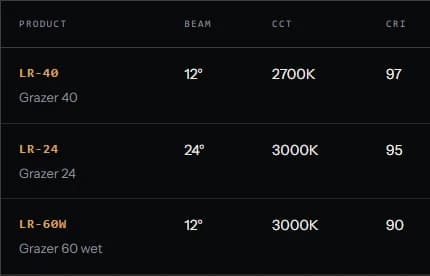
Three configurations share the family page: LR-40, LR-24 and LR-60W.
Specification requests
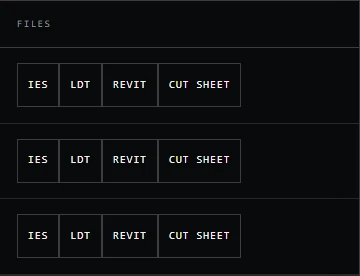
IES, LDT, Revit and Cut sheet request links sit with the product information.
Two detail crops from the same desktop product-page capture. The interface colors and labels are unchanged.
Detail crops from Lambert's LR Grazer product page, captured September 14, 2026. The intervening metric columns are omitted. Production submission transport remains a handoff to Lambert's developer.
The rebuild could preserve useful product language while changing how buyers navigate it. The request links carry product context into the form, which checks entries in the browser. The delivery connection remains unfinished; a browser confirmation alone does not establish that an inquiry has arrived. The Lambert product and specification case study documents that limit alongside the build.
What would justify the same scope for another catalogue?
A catalogue rebuild needs a requirement that the proposed architecture can meet and a documented assessment of smaller alternatives. Test whether the existing system can support the necessary product relationships, publishing workflow and buyer tasks. Establish the limitation before recommending replacement of the foundation.
For another catalogue, ask a developer to demonstrate one representative product family on the current system. Can an editor update the specification in one place? Can configurations share the right data while keeping their differences? Can buyers reach the relevant information and complete the agreed request process?
That exercise can expose the need for a content-model change, a template refactor or a larger replacement. Record which option satisfies the requirement and what it would cost to operate.
Bodie: move the store and keep the main website
Bodie Foundation retained its main Squarespace website while moving the merchandise store from Ecwid to Shopify. The work covered the store move, its shop address and the handoff between staff. The foundation's public website remained in place throughout the documented engagement as a separate system.
When a proposal bundles a store migration with a new main website, ask which requirement depends on replacing both.
- Retained
Main website
Squarespace
The public website remained in place throughout the store migration.
- Changed
Merchandise store
Ecwid to Shopify
The shop moved as a separate system, with its own address and platform.
Connection and handoff
The shop address was connected to Shopify through GoDaddy DNS. The prepared instructions were completed and the shop link and secure connection were verified at delivery.
The connection was part of the delivery
The Bodie migration included the settings that connected the new store to the foundation's shop address. Jardine coordinated access across Squarespace, Ecwid, Shopify and GoDaddy, prepared the domain change and verified the connected destination at delivery. The main Squarespace site continued operating.
The technical change included configuring shop.bodiefoundation.org as the custom address in Shopify and preparing a GoDaddy CNAME record pointing the shop subdomain to shops.myshopify.com.
An executive-director change occurred during the project. Jardine supplied the CNAME instructions, the incoming director completed that DNS step, and the shop link and secure connection were verified during handoff.
| System | What happened |
|---|---|
| Main website | Remained on Squarespace |
| Merchandise store | Moved from Ecwid to Shopify |
| Shop address | Connected to the Shopify destination through GoDaddy DNS |
| Handoff | Prepared instructions were completed and the connected shop was verified at delivery |
The Bodie store-migration case study records a four-hour technical engagement and zero hours of merchant downtime. The old store remained reachable while the new destination was prepared. Those figures describe that engagement; there is no equivalent full-rebuild quote from which to calculate savings.
Keep the main website when it still meets the requirement and the affected system can change independently. That boundary kept a website redesign outside Bodie's engagement. Jardine's custom development and integration work covers that kind of scoping question.
Compare the work and risk behind each option
Compare repair and rebuild costs against the same requirement and operating period. Include implementation, transition, testing and ongoing support, along with the staff time each option consumes. A fair comparison shows which work is included, which recurring burden remains and who is responsible for it.
A cheap patch can leave a team repeating manual corrections. A rebuild can introduce content migration and training that a focused change would avoid. Both belong in the comparison before a price is accepted.
| Cost driver | What the scope should account for |
|---|---|
| Before launch | Diagnosis, content preparation, design, implementation and verification |
| During transition | Data or URL migration, overlapping services, staff access and changes to connected systems |
| After launch | Software subscriptions, maintenance, publishing effort and responsibility for failures |
Include the operating burden when comparing proposals. Ask the person proposing a rebuild to identify the work that disappears from future maintenance. Ask the person proposing a repair how they will verify that it resolves the underlying task. A promise of easier maintenance needs a mechanism, such as removing duplicate content entry or replacing an unsupported integration.
Once the likely scope is clear, the website cost calculator can help establish a Jardine planning range. The custom website cost guide explains what changes that budget. Keep the written proposal tied to the actual content, features and migration requirements.
Estimate payback only when the inputs support it
A website payback estimate needs an incremental investment, a defensible ongoing benefit and a stated period. Compare operating costs first. When the benefit is uncertain, record the assumption and show how it affects the result before using the estimate to support a project decision.
For a basic cost comparison, add upfront and transition costs to monthly operating costs over a shared period. If internal maintenance time matters, show those hours separately and explain how they have been valued. Count each expense once.
Payback needs more evidence. A forecast of additional sales must account for the cost of delivering them, and any claimed staff-time saving must identify the work that will actually stop. Use the difference between the options, measured over the same period. Revenue, cash savings and released staff capacity have different implications for the business.
Neither Lambert nor Bodie supplies a measured repair-versus-rebuild return. Their cases help explain scope. Your own estimate needs the costs and operating assumptions relevant to your organisation.
Put the decision in writing
A short decision record should identify the required task, observed failure, retained assets, proposed intervention, evidence that could change it, acceptance condition and owner. Keeping those details together makes the recommendation reviewable and gives the delivery team a clear basis for agreeing the work.
Use the form example to see how little is needed to begin. The record below remains hypothetical: the failure has been reported, the cause has yet to be established, and no repair has been performed.
| Field | Illustrative decision record |
|---|---|
| Required task | A valid website inquiry reaches the person responsible for responding |
| Observed failure | The scenario assumes a success message appears but the expected inquiry is not received; reproduce this before diagnosing |
| What still works | Review the current content, CMS, design and form interface for retention |
| Smallest plausible intervention | Correct the delivery configuration if the investigation confirms an isolated routing fault |
| Evidence that could change the choice | The existing integration cannot meet the delivery or error-handling requirement; assess a replacement connection |
| Acceptance condition | Valid input reaches the intended destination, failures receive truthful feedback and retries behave as agreed |
| Owner and unresolved issue | The site owner names the acceptance reviewer; the practitioner investigates the failure; the cause remains open |
Record what would change the recommendation. Copy the field names into your project notes, fill them with what you know and leave an explicit “unknown” where evidence is missing.
A repair test might reveal a wider dependency. A prototype might show that the current platform can handle the requirement after all. Record that finding and adjust the scope before it becomes a contractual commitment.
Discuss the work your website needs
Bring the current website, the task that needs to work and the parts you want to retain. Those details give a practitioner enough context to discuss the investigation and likely scope. The platform decision can follow once the requirements and existing implementation have been examined.
Start with the requirement when comparing proposals, then include the changes each recommends and the reason given for them. If you have only a recurring problem, describe where it shows up and who it affects.
References (4)
- Jardine Studio. Lambert product and specification website. https://jardinestudio.com/work/lambert-architectural-lighting
- Jardine Studio. Bodie Foundation store migration. https://jardinestudio.com/work/bodie-foundation
- Google Search Central. Site moves with URL changes. https://developers.google.com/search/docs/crawling-indexing/site-move-with-url-changes
- Job Vermeulen. Workshop hero photograph. Unsplash. https://unsplash.com/photos/a-workbench-filled-with-lots-of-different-types-of-tools-gJWlckmTeYc
Discuss the website problem
Tell us the current URL, what needs to work and what you want to keep. We can use that context to discuss the next useful scope.